
Walkthrough: End-to-End Workflow of the impactOne MIS Platform
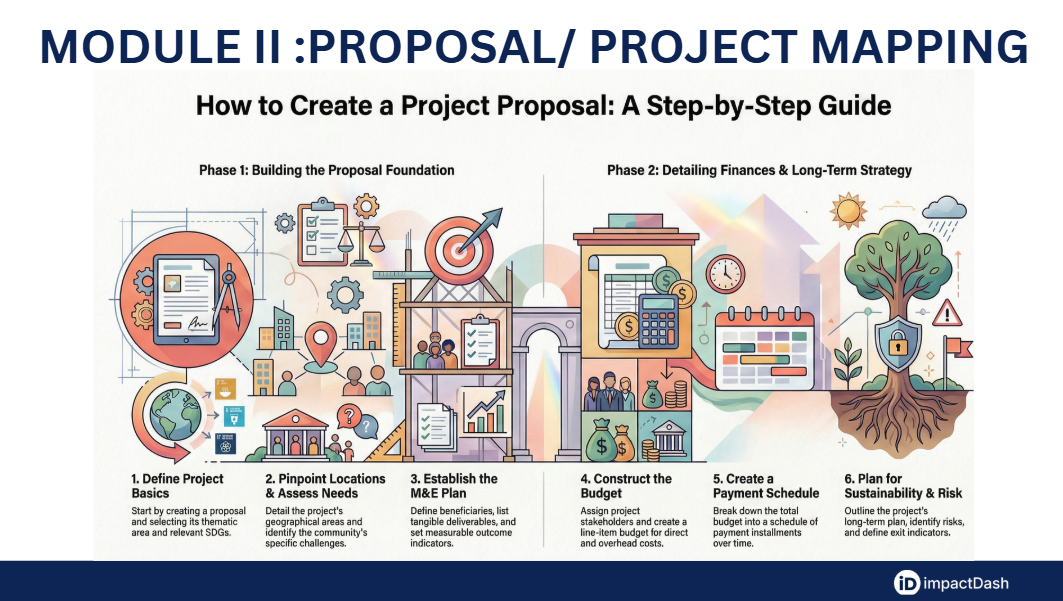
Introduction Welcome to this technical walkthrough of the impactOne MIS platform. As we navigate the project mapping module, we will follow a structured end-to-end workflow designed to ensure transparency, accountability, and sustainable impact. This guide is divided into five phases, clearly distinguishing the responsibilities of the Maker (the Partner) and Checker (the CSR Team/ Funder).
Phase 1: Project Initiation (Maker)
The workflow begins with the Partner, acting as the Maker, initiating a new project proposal.
Proposal Creation: Navigate to the ‘Proposals’ tab on the left sidebar and click "Create Proposal."
Defining Scope: You must specify the Thematic Area and relevant Sub-categories from the dropdown menus. Additionally, select the appropriate Schedule VII item, which aligns the project with statutory requirements.
Core Parameters: Assign the Implementing Agency (Partner) and the specific Maker who will have editing rights.
Project Roadmap: Set the project’s start and end dates and select the associated Sustainable Development Goals (SDGs). Finally, provide a detailed description of the Objective, Scope, and Approach, and give your project a definitive Proposal Title before clicking "Create" to proceed.
Phase 2: Project Setup (Maker)
Once initiated, the Maker must establish the physical and contextual foundation of the project.
Project Locations: Navigate to the 'Proposal Locations' section to enter the geographical area where activities will occur. This includes specific details such as Block/Taluka, State, District, and Pincode. Multiple locations can be added by clicking the “+” button.
Needs Assessment: This critical step involves identifying the specific challenges faced by the target community. You will provide a Background and Introduction, identify the core Problems, and define the Beneficiaries and Vulnerable Groups based on demographics and specific vulnerabilities.
Documentation: Use the Document Repository to upload all relevant project reference materials. You should also define any project-specific Acronyms here to ensure clarity for all reviewers.
Phase 3: Monitoring & Evaluation (Maker)
In this phase, the Maker defines the metrics for success through the M&E Plan.
Defining Beneficiaries: Enter the total number of individuals or organizations expected to experience positive changes. You must categorize these targets (e.g., Cumulative or Recurring) and set a distribution frequency, such as Monthly or Quarterly.
Beneficiary Distribution: If the project spans multiple thrust areas or SDGs, you must distribute these beneficiary targets across each specific area.
Deliverables: Define the tangible outputs of your activities. For each deliverable, specify the Indicator Type (Input, Activity, or Output), set the target quantity, and distribute it across the project timeline.
Outcome & Impact Indicators: Beyond outputs, define measurable parameters to assess progress against key metrics. Select predefined Key Indicators from the portal, establish a Baseline, and set the Target amounts for both Outcomes and Impacts. You will also select specific SDG Indicators to track alignment with UN targets.
Phase 4: Financials & Planning (Maker)
Part A: Financials
Stakeholder Mapping: Identify all parties with a stake in the project. The platform defaults to the Funder (Primary grant giver) and the Implementing Agency, but additional stakeholders can be added to define their specific roles and responsibilities.
Detailed Budgeting: Breakdown the budget into Direct Costs and Overhead Costs. For each line item, select a Costing Type: Lump Sum (total amount per year), Unit Cost (costing per unit multiplied by quantity), or Salary (amount, months, and duration). The system will auto-calculate totals based on these entries.
Payment Schedule: Once the budget is finalized, schedule it into different Installments. You must enter the budget amount and date for each payment and can optionally link installments to specific Deliverables.
Part B: Sustainability Plan
Note: The Sustainability Plan is a separate, critical requirement that must be completed before the project moves to official verification.
Strategic Outlook: This plan must outline how the project will remain effective in the long term, covering Financial, Social, and Environmental sustainability.
Risk Mitigation: Makers must meticulously identify Risks and Challenges and formulate a corresponding Mitigation Strategy for each.
Exit Indicators: Define clear, measurable metrics that signify the project’s completion or the transition into a self-sustaining phase. Ensure all details are saved successfully to move the proposal forward.
Phase 5: Official Use (CSR Team/ Funder Only)
The final phase is restricted to the CSR Team/ Funder or Admin, acting as the Checker.
Verification and Due Diligence: After the Maker submits the proposal, the CSR / Funder team accesses the Official Use section. This section is used to conduct final due diligence and record internal verification details. Only after this internal review is completed can the proposal receive Official Portal Approval.
Analogy for Understanding: Think of the Maker as an Architect who must provide the blueprints (Initiation), site surveys (Setup), and material costs (Financials) for a building. The Sustainability Plan is the Maintenance Manual that ensures the building stands for years after construction. Finally, the CSR Team/ Funder acts as the Building Inspector (Checker), who reviews all the work to ensure it meets every code and standard before the project is officially "cleared for occupancy."